





You may see a warning “This app won’t be compatible with a future version of macOS”? You’re one click away from dismissing this macOS Tahoe Rosetta 2 warning. But, should you? Mac users who run Intel-based Macs should look for alternative paths. Here’s everything you need to know about Rosetta 2 end of support.
In This Blog Post
- Rosetta 2 Breakdown
- What Is the Timeline of Rosetta 2 Discontinued?
- Who Gets Affected by Rosetta 2 End of Support?
- What You Should Do to Prepare for Rosetta End of Life
- Conclusion
- FAQ
Rosetta 2 Breakdown
This decision to move to Apple Silicon introduced a significant compatibility crisis for Mac users. Virtually the entire Mac software ecosystem had been developed for Intel’s x86-64 processors.
Demanding that users discard their existing software was not a viable option. So Apple engineered Rosetta 2 as a solution. Rosetta 2 serves as a so-called “translation point”. It intercepts legacy x86-64 software and converts its instructions into ARM64 code. This translation occurs at load time, before execution begins.
The M-series chip can then run the translated code as if it were native. But Rosetta 2 was never meant to be a permanent fix. Its only job was to buy time. The goal was to keep old software working while developers rebuilt their apps for ARM64. Apple made this clear from the very beginning.
What Is the Timeline of Rosetta 2 Discontinued?
| macOS 26 (Tahoe) | Rosetta 2 still works fully. This macOS version will support Intel Macs. Intel users won’t be able to upgrade beyond Tahoe. |
| macOS 27 | Rosetta 2 will work until September 2026. Intel Macs will no longer be updated. |
| macOS 28 | Rosetta 2 ends. Apps that aren’t designed for Apple Silicon will stop running. |
Who Gets Affected by Rosetta 2 End of Support?
Apple Silicon users with up-to-date apps
You will likely feel almost no impact. You may not even be running Rosetta 2 at all. Most popular apps have already shipped native ARM versions.
Intel Mac owners
macOS feature updates are already over for you. Your security patches should continue for a few more years. But the hard reality is that your machine is now on borrowed time. It is time to start planning a hardware upgrade.
Developers
As a developer, you must feel the most urgent obligation. Any app still shipping an Intel binary needs to be ported to ARM before macOS 28 arrives. Apple’s deadline is not a soft one. After macOS 27, Intel apps will simply stop working for most users.
Users of niche or legacy software
Outcomes are difficult to predict. Legacy scientific tools, older creative applications, and certain games may never receive native Apple Silicon ports. Users in this situation need to start identifying alternatives now.
Enterprise and IT teams
You should get prepared for a complex transition. You should start by auditing which apps rely on Rosetta. Next, find native or alternative replacements.
What You Should Do to Prepare for Rosetta End of Life
1. Check apps that use Rosetta
- Open Activity Monitor.
- Go to the CPU tab.

- Add the “Kind” column
- Any app listed as “Intel” is running through Rosetta 2.
- This gives you a clear picture of your exposure.
2. Update your apps
- Go to the App Store.
- Select Updates in the sidebar.

- Install all pending updates.
- Check apps installed outside the App Store.
- In the app, check the App Name.
- Check for Updates (or visit the developer’s website for the latest release).
- Run the Terminal “file” command.
- If the app now shows “arm64” or “universal”, you’re done with that one.
3. Contact developers
- Go to the developer’s website.
- Leave comments about the need for updates.
- Developers prioritize ports with visible user pressure.
4. Start identifying alternatives
- Define what you need from the app.
- Search AlternativeTo.net.
- Visit developer forums for native alternatives.
- Look for “Apple Silicon” or “M1 native.”
- Start the migration now.
5. Plan your hardware upgrade if you’re on Intel
- Go to the Apple menu and About This Mac.
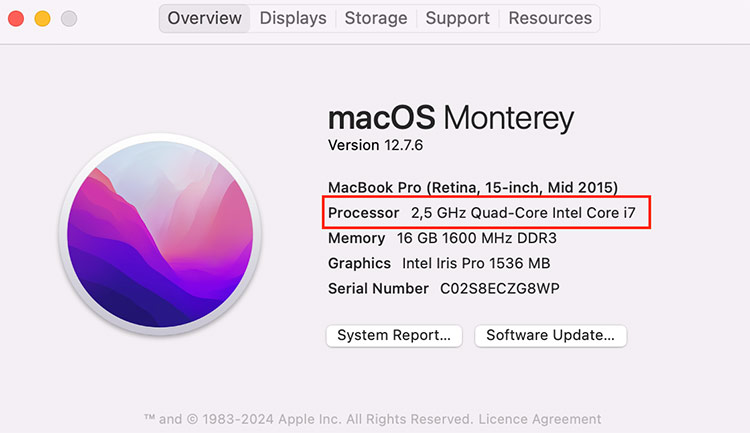
- If the chip line shows “Intel Core”, you are on Intel hardware.
- macOS feature updates stopped with Tahoe (macOS 26) for your machine.
Conclusion
Ultimately, the retirement of Rosetta 2 is the end of the Intel Mac era. Apple has given users and developers a generous and transparent timeline. Check your apps today to see which are running on Rosetta, and create a migration plan to complete the transition before the closing date.
FAQ
Any app that has not been compiled natively for Apple Silicon will no longer run after Rosetta end of life. A small portion of functionality will still be retained. However, its use will be restricted strictly to legacy gaming titles.
At present, Rosetta 2 continues to perform its binary translation layer functions. macOS 27 will mark the final release with native Rosetta 2. Users running x86-64 have approximately a 12-month migration window.
Yes, Rosetta 2 support for apps will end after macOS 27. Apple continues to support only older, unmaintained gaming titles and software running Intel binaries in Linux VMs beyond macOS 27.
Yes, warning messages are sent in macOS Tahoe 26.4 beta. You are being informed that the app won’t run on the next versions of macOS. Don’t dismiss these notifications and develop a migration plan once you start getting them.
