





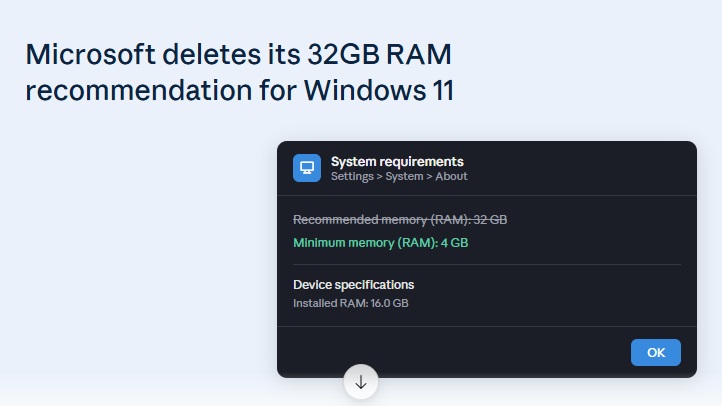
Microsoft has spent the past year telling PC gamers to buy more memory. Now it has gone back and erased that advice. No announcement was made. No blog post explained the change. The support pages simply disappeared.
This quiet reversal says a lot about where the PC market stands right now. RAM prices are climbing fast, Microsoft is shipping its own devices with less memory than it once recommended, and the company appears to be choosing a new strategy: optimize the software instead of asking users to buy more hardware.
In This Blog Post:
- Windows Latest 32 GB RAM Removed: Explained
- Why Microsoft Pulled the Recommendation
- Microsoft’s New Plan for Windows 11 32 GB RAM
- Windows 11 32 GB RAM Deletion and Its Practical Implications
- Windows 11 RAM Recommendations If You’re Building or Buying a PC
- Wrap Up
Windows’ Latest 32 GB RAM Removed: Explained
The story starts with two documents. Both were published on Microsoft’s Windows Learning Center. One was titled “How to optimize your gaming PC setup.” It was published on November 28, 2025. In it, 16GB of RAM was described as fine for most games. 32GB was called the “no-worries zone.” It was named the ideal choice for demanding titles or heavy mod use. A second document was spotted in February 2026. Similar guidance was repeated there. Copilot+ PCs were also promoted as gaming-ready machines, with hardware said to be tuned for the job.
Both pages have now been removed. Their old web addresses are redirected straight to the Learning Center homepage. The original content is no longer shown. The deletion was first spotted by Windows Latest. According to that report, no trace of the November document was found in the Wayback Machine’s most recent capture. Archived versions from earlier snapshots are still available, however.
The removal happened in two stages. Gamers and tech outlets criticized the 32GB recommendation earlier this year, and Microsoft pulled the 2026 version of the guidance in May. The November 2025 document lingered a while longer before it was deleted as well. At this point, every public trace of the 32GB recommendation appears to be gone from Microsoft’s own site.
Why Microsoft Pulled the Recommendation
The timing is not a coincidence. DRAM prices have risen sharply through 2026, driven by a memory shortage that has hit the entire PC industry. A 32GB kit that once felt like a reasonable upgrade now costs significantly more than it did when Microsoft’s original guidance was written. Recommending 32GB as the “worry-free” standard looks very different in a market where memory has become one of the most expensive components in a build.
An awkward contradiction is also sitting right on Microsoft’s own store shelves. Several Surface devices are currently sold by the company with 8GB of RAM as the base configuration.
The devices sold include:
- Surface Pro 12
- Surface Laptop 13
- Surface Laptop for Business
Customers were told that 32GB was the ideal amount for a good Windows 11 experience. At the same time, new hardware was being sold with a quarter of that. This was never an easy position to defend. By removing the guidance quietly, the conversation is avoided altogether.
Microsoft’s New Plan for Windows 11 32 GB RAM
Instead of asking users to buy more memory, Microsoft says it wants Windows 11 to run better on the memory people already have.
Microsoft’s new approach, step by step:
- Memory use is being audited. Key features and built-in apps are being reviewed for how much RAM they consume.
- Efficiency improvements are being built. Rather than asking users to buy more memory, Windows 11 itself is being optimized to use less.
- 8GB and 16GB systems are being prioritized. These improvements are aimed specifically at lower-memory hardware, not high-end configurations.
- 8GB is being treated as a real target. The goal is for Windows 11 to be genuinely usable at this level. It steers away from the idea of “tolerated.”
This marks a meaningful shift in direction. For most of Windows 11’s lifetime, sluggish performance was assumed to be fixed by adding more RAM. Now, software efficiency, not hardware upgrades, is being signaled as the fix, at least publicly.
Windows 11 32 GB RAM Deletion and Its Practical Implications
It is worth being clear about what this deletion does and does not mean.
| What Changed | What Didn’t Change |
| The 32GB recommendation was removed from Microsoft’s support pages | Windows 11’s official minimum system requirements |
| The public messaging around ideal RAM was softened | Actual memory-efficiency improvements — none have shipped yet |
| The documentation was quietly edited | How Windows 11 performs on 8GB in practice |
| The benefit of 32GB for demanding modern games | |
| The struggle 8GB systems face with heavier multitasking or AAA titles alongside background apps |
In other words, this was a documentation change, not a technical one. The removed pages were guidance, not a formal compatibility requirement, so nothing about how Windows 11 actually performs has been affected. What Microsoft has changed is the message it is willing to put in writing.
Windows 11 RAM Recommendations If You’re Building or Buying a PC
For anyone shopping for a new Windows 11 machine or planning an upgrade, the practical advice has not really changed, even though Microsoft’s official messaging has.
- 8GB is still tight. It works for basic browsing and office tasks, but it leaves little room for modern games or heavy multitasking.
- 16GB remains a sensible baseline. It covers most everyday use and many current games comfortably.
- 32GB is still the safer choice for serious gaming or content creation, especially with mods, multiple background apps, or demanding titles, even if memory prices make that harder to justify right now.
The removal of Microsoft’s recommendation reflects market pressure and public relations concerns more than a change in what your PC actually needs to run smoothly.
Wrap Up
It is not yet known if Microsoft will follow through. Windows 11 may or may not become lighter for 8GB and 16GB systems. Until then, one approach remains the safest. It’s the same one PC builders have always used. Buy the RAM your workload actually needs. Don’t buy based on a number a support page happens to display this month.
